AtariCrypt is all about the Atari ST/e computers, but I shall make an exception for its big brother. I recently contacted Janez Valant (Swe from YesCREW), and he mentioned a Falcon release of Knight Lore, which might interest those unfamiliar with it. I was one of them. How did I not know about this game?
I’m a huge fan of Ultimate’s iconic isometric ZX Spectrum game from 1984 (so long ago!!). I vividly recall its release and the sheer awe we felt at the next-generation visuals. Each puzzle was presented as a 3D room, but nothing quite like this. Frankly, it was one of those truly mind-blowing moments in gaming history.
The Falcon version seems to be the complete game with spot-on, perfect gameplay. Heck, it’s probably even better as it lacks the slowdown of the Speccy version. However, the lovely monochrome palette has been replaced with a very colourful one, which is perhaps a bit too much. It feels unnecessary.
A part of me doubted Janez, but here it is running brilliantly on my virtual Falcon (Hatari). I’m sad it doesn’t work on the ST/e. Ignoring the tacky colours, I don’t understand why the ST can’t handle it. Someone must know the answer, but if it’s just because of the extra colours - I’ll be furious!
Playing this iconic game on the Atari Falcon is fantastic. All I need now is a real Falcon...
Download Knight Lore and relive 1984 ZX Spectrum style!!
Those with a keen eye will notice the larger screen space of my GEM desktop. What about the three resolutions that appear selectable? If you saw these things, then you're an Atari ST rock star. I salute you!
I've been experimenting with a few GEM programs that allow larger resolutions and other cool stuff. Some use interlacing to double the vertical resolution, but that can look odd and hurt my eyes! (use 60Hz!!). Others can create a virtual screen by using the Atari STe's hardware scrolling. Why would you wanna scroll?
Interestingly, some programs feature overscan. This is a technique used to make use of the empty borders, and it sparked my curiosity. Using this extra screen space is great, and without any slowdown. Most GEM programs should work perfectly fine, and I'm left wondering why Atari couldn't have made this standard?
I've made a bundled download of these programs - please let me know if there are others I've missed.
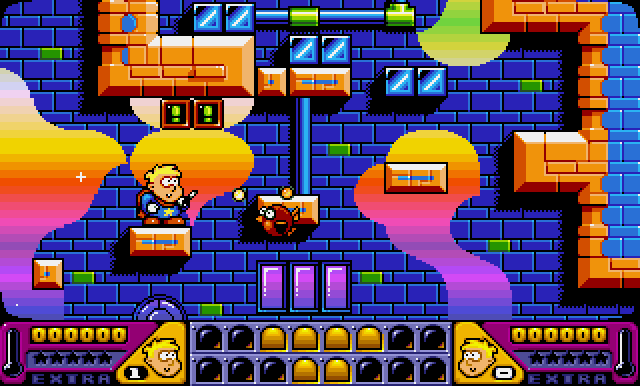
Magic Boy was released in 1993 by Empire and is one of the cutest platformers I have ever seen. Personally, it reminds me of Rainbow Islands because of its ravishing visuals and charming style. It's a stunner!
We play as Hewlett, a young boy with a magic wand who accidentally turned all the animals into cute monsters. Seems plausible, but how do these things keep happening? Not to worry, it's our task to restore everything back to normal, so that means venturing forth through many beautiful worlds to tag & bag the nasties.
Firstly, check out this screenshot. Wear sunglasses and take a deep breath...
Magic Boy must be one of the most colourful games on the Atari ST.
Shoot, jump, bag & grab!
There are four worlds to explore (Sand Land, Wet World, Plastic Place, Future Zone), and each offers eight levels. Things begin relatively easily before lots of crafty tricks and traps are introduced. This difficulty is staggered, which helps to keep things interesting - without being too tough to play properly.
This mild learning curve is nothing much on the easier levels. It's easy to pick up and play, so you're instantly leaping your way through. Make sure you collect all the power-ups, which will aid your progress. Just watch out for anything that looks oddly cute. It's not, it's nasty - so shoot and then bag it. Great stuff!!
However, the later levels are challenging, and I really mean formidable!! Those cute critters are actually deceivingly mean and seem to know just when to strike with a perfectly well-timed shot. Also, the level layout adds the usual moving tiles, and others might dissolve or randomly disappear. Infuriatingly difficult, which can be a shame sometimes, as the levels are impossible for me to complete (without a trainer!!).
Wanna see another multi-coloured screenshot? I know you do...
Things are now starting to get serious with cunning-level designs!
Aesthetics
This is literally one of the most stunning 16-bit games I have ever seen. This quality is thanks to John Dale and Leigh Christian, who made everything bright and radiant with many comical characters. Nothing has been sacrificed, which includes your fluent movements and ultra-smooth scrolling. Wonderful stuff!!
Sound effects are excellent and best experienced when using an Atari STe. Yes, I said STe, but that doesn't mean the ST is lacking. Not one bit. Accompanying music is perfect with a high-quality tune that remains in your head all day. Yes, Magic Boy is most definitely one of the sexiest Atari ST games I have ever played.
Why couldn't every game have this much love put into it? Let's view another screenshot...
Future Zone has incredible levels to hop through, as does the quirky Plastic Place.
The CryptO'pinion?
You won't be shocked to hear that this is one seriously addictive platformer. Yup, it's near perfect and a genuine pleasure to play because it's so much fun, and I really cannot think of anything negative to say. Okay, okay, that difficulty in later levels is really tough, but something weirdly reminiscent of games from the era.
The controls, game mechanics, visuals, and audio are stunning and make this game a showcase, but one that is also loads of fun and a thrill to play. Doesn't this prove what the Atari ST/e is capable of when in the hands of talented people? This is one of the best 16-bit platformers ever released.
Grab yourself either the floppy disk and there are loads!
This is a version for hard drive/Ultrasatan by 8BitChip.
The codes for those who wanna zip through to the later levels: on the menu screen, press and hold the keys before pressing fire to choose: