Saturday, July 06, 2024

Welcome to my adventure - day three


Slow down, Steve... Learn!

Welcome to the third installment of my Cosmos adventure (check out parts one and two). Let's be honest, I feel my progress should have been "better". I was a fool and paid for my cavalier attitude by suffering defeat at the hands of bandits. Hmm, I need to heed my previous words and learn the basics before rushing off!

Don't worry, part four will still happen - I did indeed restart. And ditched my foolish plans of scouring the galaxy system looking for bars, casinos, loose women, and cheap motels. That's right, I need to grow up and learn more about this game - starting with the schematics of my spaceship.

Beginning with the ship, it has a bewildering array of functions - from engines and shield generators to sipping water or catching up on sleep. Each component has a placeholder tile that provides access to that particular aspect of the ship. Stand on it and hit <return> for access. Have a play and go through them all to understand your new ship. There are many fascinating features, such as lasers, shields, and a star map.

Now that you're familiar with the different parts, it's time you took it out for a test drive. First, stand on the Pilot Control tile and hit the <return> key. Your view changes to the outside, and you're good to go:

  • Tapping the backspace key lifts you high into the air. You can use the cursor keys to explore nearby - which is quicker than walking! Better still, hit the backspace key once again to take you into orbit. Wanna leave the planet and explore the solar system? Then tap the backspace key again to do just that.
  • Tapping the backspace key always increases your altitude whereas the return key lowers it. So repeat the above process, in reverse, using the return key and you're back on the planet again. Dead easy.
  • The only other key is the <spacebar> which changes your view to inside the Cosmos.

During your travels, you shall notice something called Deuterure. This is the fuel used to get about. Just like the expensive petrol for our cars, this depletes as we fly about. Of course, you should look to replenish it at stations or towns that offer this service, not all will. The "same" also applies to oxygen and water.

I've made a map of the ship detailing its many parts. Those with a keen eye will notice my silly mistake - can you spot it? Okay, I think that's it for "day three". I would love to hear from anyone playing Cosmos Chronicles. So comment below with your tips to share from this stage of the wonderful adventure.

Having restarted, I've made enormous progress, so look out for "day four".

Until then, check out these screenshots...


Click this blurry thumbnail to access the original image of the ship's internals.
(stop squinting and click the damn image - is there anybody here reading this?) lol


Yes, you can go outside! Keep an eye on your suit's oxygen levels.
(An amazing feature that I'm anticipating will be needed later in the game)


Eating, drinking, and sleeping help to keep you alive...
(Your ship feels the same way, so remember to top up its fuel whenever you can)
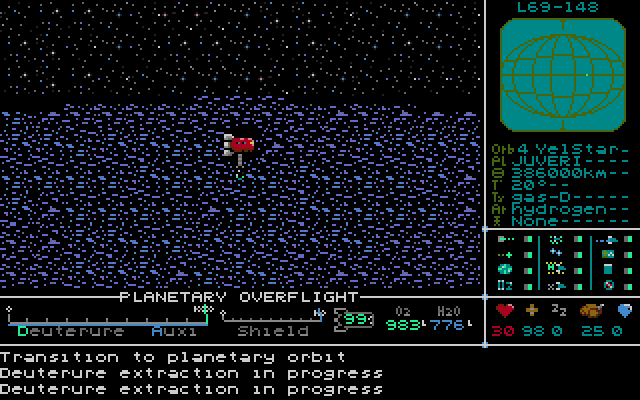


Of course, there are other ways to top up your fuel tank.
(Depends on the type of planet)


I'm exploring Acriel from the comfort of my new spaceship.
(There is more to a planet than just towns and cities)


The brown planet is Acriel. Let's go and explore everywhere. Come on!!
(Yes, as you read, I regretted my maverick attitude later on)


The universe is massive and littered with galaxies you can explore.
(Did you remember to save regularly? Just in case you suffer, say... an ambush!)


My fun didn't last long. Ambushed with little chance of winning!!
(I didn't stand a chance. Four-on-one wasn't too fair. I should have run!!!!!)

Friday, July 05, 2024

Welcome to my adventure - day two


Animals = Protein

Welcome to the second part of my Cosmos Chronicles adventure. If you missed it, you can read part one by clicking here. To recap, we witnessed our family being murdered. Thankfully, my uncle managed to pass on vital information before biting the dust - to the north is a man with a wicked sense of humour. I wanted more information, but he's dead - so I slaughtered his animals and headed to my spaceship.

You heard me correctly - gather food by killing bunny rabbits and other creatures. YUM!

Wait, did you listen to Cepece? I hope so because your first task is to seek somebody called Grostonton, on a space station outpost. Until you have found him, the adventure cannot begin because your spaceship is crippled and restricted to this solar system. You should seek him, so hop into your spaceship!

When aboard, a robotic assistant called Wilson appears for a chat. At this stage, he has little to say. So have a wander and check out the different stations; it's overwhelming and quite a Sundog moment with a hefty learning curve. Each part of the ship has a unique function that requires care, repair, and maintenance.

I plan to cover this in part three because it's complex. Until then, have a play with your spaceship; get a feel for it. Here are some screenshots from today's slice of the adventure. I'll see you soon for part three :-)


"Old Cepece" ... I think... means "old man". And he is just that!
(Sadly, there's no way to interact with cupboards/etc to search for items)


I'm on board Dad's old spaceship. It's called Cosmos, and it's all mine!!
(The circled tiles represent each of the ship's different functions)


As you can see, the Cosmos isn't in perfect condition. Three systems are damaged.
(It's way too early at this stage, but you will learn how to trade, repair, and install ship parts)


Having seen my family murdered, I was feeling... nervous. Thankfully, I found a toilet!
(hey, don't blame me for my typically British sense of humour!)


Cosmos actually has a shower. So, I took a shower. Much-needed water usage ;)
(I thought this was hilarious, and the tiny graphics are superb)


Ah, this will be helpful - a log of all outstanding quests.
(Hit return for the side missions, below. Again, it shows "pokindex" (your combat victories)


The ship also holds a list of side missions. One is near a black hole! :o
(Unlike many games, these are fascinating side events and doable)


I forgot about Grostonton and decided to take Cosmos for a spin instead...
(I was getting used to the game, so I experimented... I then got ambushed!!)

Wednesday, July 03, 2024

Welcome to my adventure - day one


The trouble with me is...

Wow, where do I begin with that? Anyhow, regarding the ST and AtariCrypt, I'm a bit daft and usually annoy myself. I always have too many games on the go! I hardly ever finish writing before moving on to the next. Sigh, so this time I've decided to concentrate on one game. Something that I find truly fascinating.


Cosmos Chronicles

If you're wondering what Cosmos Chronicles is,   then you're either dead, in a coma, or just insane. I previewed it yonks ago. Perhaps you should check that link out? This is such an engaging adventure, a unique mash of ideas and somewhat a futuristic Ultima you might say - with touches of Sundog and Frontier!

So, I figured it would be a great game to feature my progress. Kinda like I did for Atari's Super Pack and when mapping Sword Of Kadash. However, with shorter posts this time, I can knock them out more quickly. However, note that I'm no expert adventurer. I'm merely an ST dude with a wonderful new game :)


The game

We are a chap called Floyd Cooper, and we live on Acriel, a small rock orbiting a larger planet called Nova. Here we work the land as farmers with my Auntie and Uncle Vetea. Sadly, the military turned up and killed them! Our father's spaceship is inside the barn, and a friend is to the north. Better check all that out, eh?

Exploring Acriel is easy, similar to what you would have seen in Ultima. Move with the cursor keys, then enter a building by walking up to it and tapping the 'up arrow'. Once inside, explore as you did outside. Additionally, to interact and select/talk/pick up, you should press the 'Return key'. The cursors are now used to select items in the inventory and to perform relevant actions. Hitting "backspace" cancels and returns to the game.

Interestingly, Cosmos Chronicles supports the Blitter Chip so will feel faster on the Atari STe.

Additionally, the backspace key will be used within the Cosmos to take off and enter space. The 'spacebar' is also used, but more on that later in this series. Finally, the 'ESC key' can be used to quit. Don't be a quitter!!


"Day one"

The early stages of this tragic storyline are ideal for learning the gameplay. It allows easy learning of the interface, exploration, item collection, radar use, and interaction with the soldiers (battles!). The interface is straightforward - top/right is the planet's conditions under the radar. Further down are details on health, fatigue, food and water. Under the play area are your inventory and a message/communication area.

I'll no doubt die and restart multiple times, but I hope this will be an enjoyable adventure to document. Perhaps this might inspire you to buy the game? Please note that this isn't a walkthrough - not possible - it will be my romp through the adventure. Wish me luck - my only wish is not to embarrass myself ha!!

Let's look at the trials and tribulations we go through before the game really begins...


We've been rumbled! Skiving under a tree, we hear a distant noise at the farm.
(Note the radar, top/right, this helps to show where the farm is)


Heading northwest, we arrive at the farm, but our uncle has a worried look on his face!
(Hey, there's a field of food... I wonder what is inside that barn?)


Of course, we decided to check out the farmhouse first... Ah, a weapon!
(Note the inventory - food/water. On the right are your stats)


Those soldiers are cruel. At least they didn't kill that cute cow!
(Mmm, there's nothing tastier than a big, juicy steak)


This takes us into our first battle. Note the new options and helpful info on the right.
(Your first battle is confusing - choose to arm yourself first and then attack)


Buried them quick, didn't I? Anyhow, our uncle survived long enough for a few final words.
(You could walk north, it's not far. But you have a spaceship now...)


We're scared but bravely head northwards into unknown lands.
We find food, animals, and a house. Let's investigate inside that house!

Sunday, June 30, 2024

Money For Nothing


Money for nothin', chicks for free

I was going through some older videos on my channel and found this one by the Glasgow Computer Centre. The Picture And Sound Show is a partial sample of the sound recording of the legendary song "Money For Nothing" by Dire Straits. I must admit, I'm curious about how they came up with their name for it!

Your ST requires 1MB of RAM and a double-sided drive. Don't scoff, this was 1986, and my family couldn't afford an Atari ST for two more years. Heck, I didn't know the joy of 1MB RAM until around 1990 when I got the SIMS for my STe. Additionally, they released a half-meg version for those unwilling to upgrade ;-)

It's incredible that this "music demo" was released in 1986. I would easily have assumed 1988/89 if I didn't already know. Of course, this isn't the complete song; the ST would have needed a hard drive, and who had one back then? Look, for 1986, it is jaw-dropping, so leave it playing and enjoy the quality recording.

This is a timeless song. A rock classic. Let me know in the comments if you want more...


Credits

Glasgow Computer Centre
John Ray - Code
Scott - Code

Glasgow Computer Centre - https://demozoo.org/groups/38699/
Download in POV #085 by Persistence Of Vision - https://demozoo.org/productions/73899/